Share
Extract:Dialogue 2
Extract:Dialogue 2
Couldn't load pickup availability
Extract:Dialogue 2 delivers next-generation dialogue cleaning for film, TV, and streaming, combining advanced AI with real-time reverb reduction, optional M/S processing, and a streamlined mixer interface. Built with input from post-audio professionals, it offers precise control over dialogue, noise, and ambience while preserving natural tone.
Introducing Extract:Dialogue 2
The trusted dialogue cleaner, now in a class of its own. Already a staple amongst countless post professionals for its transparency and ease of use, Extract:Dialogue 2 builds on the success of the original Extract Dialogue, adding major new features including reverb reduction, EQ editing per channel and true stereo processing.
Version 2 takes everything that made the first plugin popular and pushes it much further, combining the latest cutting-edge AI with new precision controls professionals have been asking for.
While delivering real-time, broadcast-quality results instantly using the latest generation of Acon Digital's AI models, with Extract:Dialogue 2, every part of the process can also be fine-tuned with surgical precision. It's the plugin that works as fast as you do, and still lets you dig deeper when you need to.
Simple, one-time pricing. No subscriptions. Pay once, own it forever.
Deep control when you need it
For professionals who need precision, Extract:Dialogue 2 introduces a set of advanced workflow tools:
Independent Channel Control
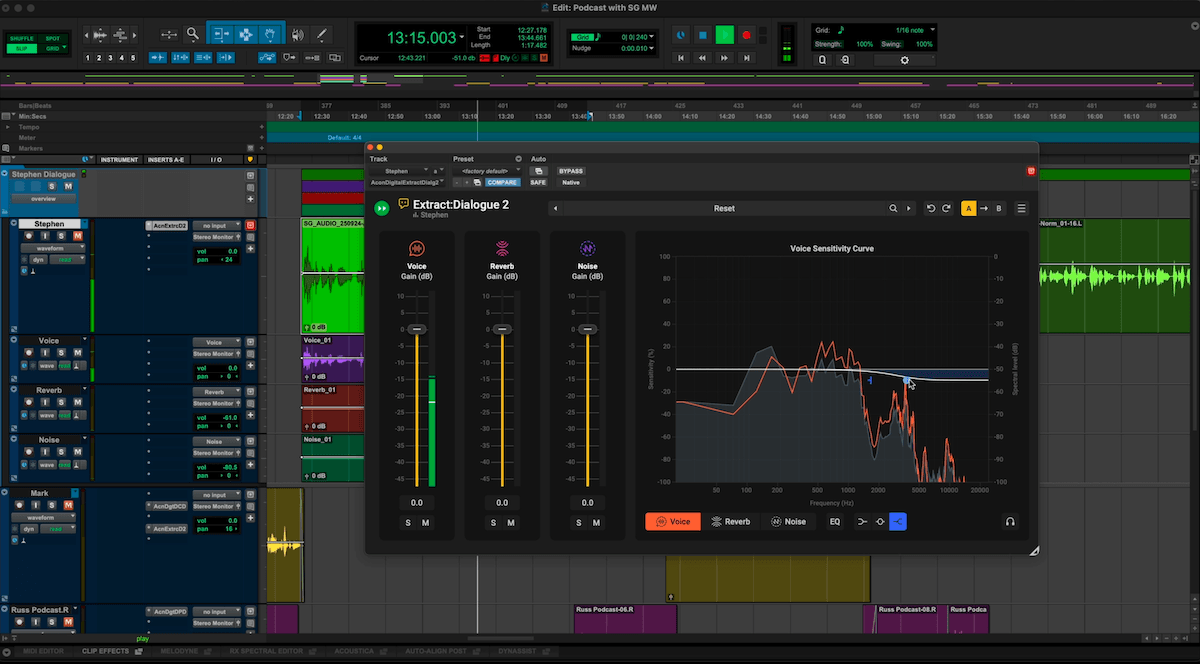
Stop fighting one global setting that helps one element while hurting another. With separate faders, mute, and solo for Voice, Reverb, and Noise, you can isolate exactly what you're hearing and adjust each piece on its own terms — so cutting noise never means losing voice presence.
Per-Channel Sensitivity
Fine-tune how much signal gets detected in each channel with independent sensitivity controls. Dial in exactly how much is treated as voice, reverb, or noise, so nothing gets over- or under-processed.
Frequency-Focused Detection
Not every problem lives in the same part of the spectrum — room rumble and high-end hiss need different treatment. Frequency-dependent sensitivity curves let you zero in on the exact range causing trouble, so you fix the actual issue instead of over-processing the whole signal to compensate.
Tone Shaping with Per-Channel EQ
Killing reverb or noise outright often leaves dialogue sounding flat, dry, or disconnected from its space. Per-channel EQ lets you shape tone instead of just removing it — soften reverb brightness without losing the room, or clear rumble while keeping natural ambience — so the result still sounds real.
Full DAW Automation
A fixed setting can't follow a scene. Full automation of every Voice, Reverb, and Noise control means dialogue perspective can shift as the picture does — a character moving away, a cut tightening up — without you re-processing or swapping settings mid-edit.
Advanced UI Controls
Resize and adjust the scaling to suit your workflow and screen size.
Shaped by top professionals
Extract:Dialogue 2 was designed and built with direct input from some of the world's leading dialogue editors, mixers, and sound designers who rely on tools like this every day. They told us what slows them down, what competing products get right, and where they fall short. The result is a voice cleaning tool that sets a new standard for speed, accuracy, and flexibility in real-world dialogue work.
Built for your workflow
Integrating easily into any post chain, you can use Extract:Dialogue 2 in real time or export dialogue, reverb, and noise stems separately for advanced mixing. The fully resizable interface lets you show only the controls you need, keeping sessions uncluttered and freeing up valuable screen real estate.
Clear visual feedback
A real-time spectrum display visualises every part of the signal. Separate colour overlays show the voice, reverb, and noise components, while solo and mute buttons make it easy to hear exactly what's happening.
Features for detailed editing
- A/B comparison for quick auditioning of alternate settings
- Undo and redo for experimentation without risk
- Factory and user presets for common recording situations
- Audition mode to monitor what's being removed
- Full stereo processing that applies independent AI models to mid and side channels for cleaner centre dialogue and natural width
Fits your workflow
Extract:Dialogue 2 adapts to the way you work. It can be used in real-time during editing, or as part of a larger post-mix chain. The interface can be resized to show either the full control set or just the mixer panel for compact layouts. Multi-output routing lets you export dialogue, reverb, and noise stems separately for advanced mixing.
Applications
- Cleaning dialogue tracks for film, TV, and streaming
- Reducing noise and reflections in interviews or documentaries
- Restoring ADR and location recordings
- Enhancing clarity in podcasts, voiceovers, and web content
- Preparing clean stems for dubbing or foreign-language versions
- Recovering intelligibility in archival or field recordings
All Features
- Fully automatic noise and reverb reduction based on deep learning
- Independent volume control for the Voice, Reverb, and Noise channels including mute and solo buttons
- Sensitivity adjustments per channel, for fine-tuning how much signal is being detected
- Each sensitivity control features frequency-dependent curves to focus processing where it's needed most, from midrange chatter to high-end reflections
- Dedicated EQ sections for each element, allowing tone shaping within each component. You can soften reverb brightness without muting it completely or remove low-frequency rumble while keeping natural ambience
- All Voice, Reverb, and Noise controls can be automated inside your DAW (Supported Hosts Only)
- A/B comparison for quick auditioning of alternate settings
- Undo and redo for experimentation without risk
- Factory and user presets for common recording situations
- Audition mode to monitor what's being removed
- Full stereo processing that applies independent AI models to mid and side channels for cleaner centre dialogue and natural width
- Resizable graphical user interface
System Requirements
Windows
CPU: Intel Core i5 or AMD multi-core processor (Intel Core i7 or faster recommended)
RAM: 1 GB (4 GB or more recommended)
Disk: 1 GB free HD space
OS: Windows 10 / 11
Mac
RAM: 1 GB (4 GB or more recommended)
Disk: 1 GB free HD space
OS: OS X 10.13 or later